
What Are You Doing Over and Over Again?
What Are You Doing Over and Over Again?

A recent NACCU webinar with Spencer Litzenberger from The Ohio State University’s BuckID office offered a good reminder that some of the best automation ideas start with very ordinary frustrations.
Manual and Monotonous Tasks
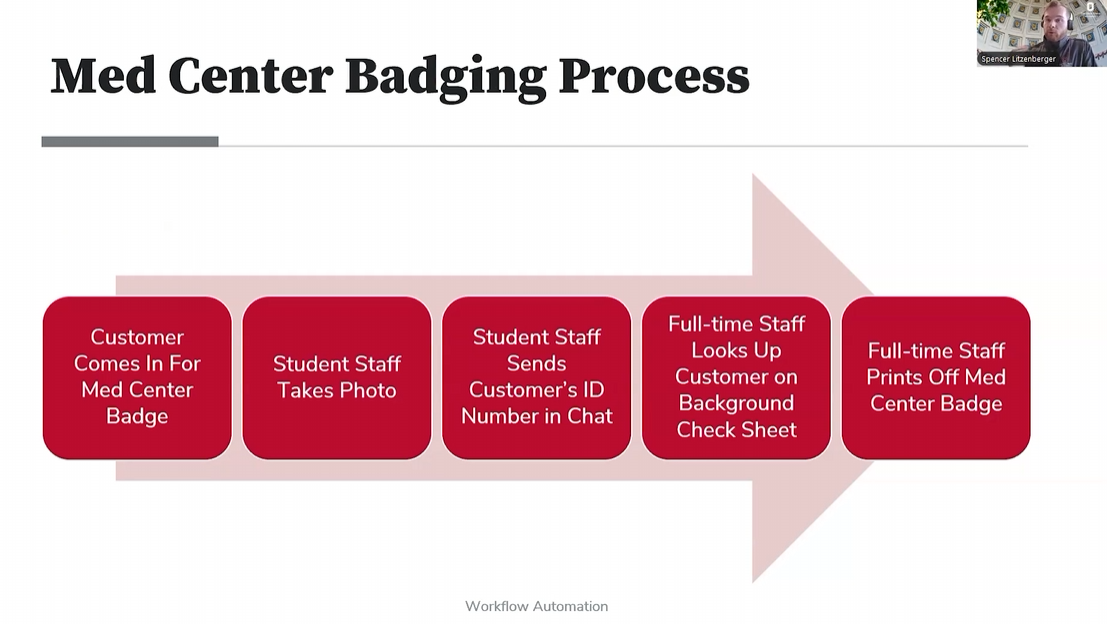
One of the first examples Spencer shared involved background checks for medical center badges. Every day, the office received an updated spreadsheet by email. Someone had to download it, rename it and put it somewhere student employees could access.
It was not a huge job, but was just one more manual task that someone had to do every single day.
The problem was that student employees working the front counter did not have access to the shared email account. If a background check cleared after the most recent file had been downloaded, the student helping the customer might not know it. Then a full time staff member had to get involved, the customer might have to explain the situation again, and sometimes the person had to come back later.
Automation to the Rescue!
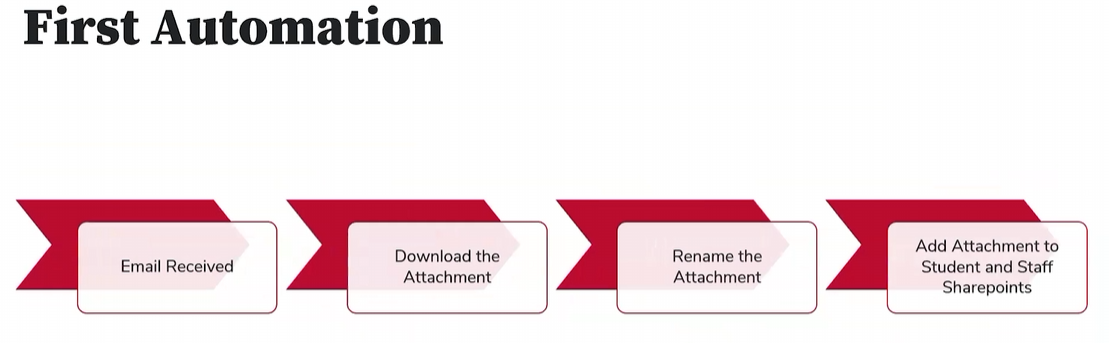
Spencer built a Power Automate workflow that watches for the email, grabs the attachment, renames it with the date and places it in SharePoint automatically. Now the updated file is available to the people who need it without anyone having to remember to move it.
That example says a lot about where automation can be most useful. These small repetitive tasks that interrupt the flow of more important work is what automation is made for!
What Else Can Be Automated?
Once that process was working, Spencer started looking at other repetitive jobs around the office. Lost ID emails were one of them. Student employees could handle much of the process when IDs were turned in, but a full time staff member still had to send the email telling the cardholder that the ID had been found.
Again, not difficult... but requires someone to take time out of their day to send the email.
That process was automated too. A student fills out a form and the email is sent automatically. By the time of the webinar, the automation had been used almost 340 times and had saved more than six hours of full time staff time.
The same thinking applied to attendance readers. Ohio State had moved to wireless readers, which meant staff now had to remember to keep them charged. Spencer created automated email reminders for readers scheduled to go out for events.
On the morning of the webinar, one of those reminders prompted him to check two readers. One was sitting at 12 percent. It was plugged in and charged before it was needed.
Think About the People Using the Process
Another theme throughout Spencer’s presentation was keeping the process easy for the people actually using it. When he built a badge request and approval workflow, he made sure information could carry forward instead of asking people to enter the same details again. If someone already had an approved form on file, the system could tell them they did not need to repeat the whole process. When one department wanted to use only part of the workflow, he adjusted it so they could do exactly that.
That may sound obvious, but plenty of processes are built around what the system needs rather than what makes sense for the person using it.
No Programming Background is Needed to Get Started
Spencer also made the point that he did not start with a programming background. His closest experience was using functions in Excel. His first automation took about eight hours because he was figuring things out as he went. After that, some of the later automations took only an afternoon to build.
There were limitations along the way too. At one point, he wanted the system to create a Word document, but that required a premium connection his office did not have. So he found another way to create something student staff could print.
That may be one of the most useful takeaways from the whole webinar. Automation does not have to begin with a major project or a long technology plan. A much better place to start may be with the tasks people are already tired of doing over and over.
- What gets downloaded every day?
- What email gets sent repeatedly?
- What depends on someone remembering to move a file, check a list or send a reminder?
Those are the kinds of jobs worth looking at first.
Because sometimes the clearest sign that something is ready to be automated is hearing someone in the office say, once again, “Why are we still doing this manually?”
Thank you to Spencer Litzenberger for sharing what you've learned.